Back to projects

Case 01 · AI Product System

Design MCP

Design stopped being a queue.

DESIGN MCP PRODUCT EXPLORATION · 2026

One foundation.
Connected workflows.

Choose an approved template.
Create in conversation. Review in context.

Design Center
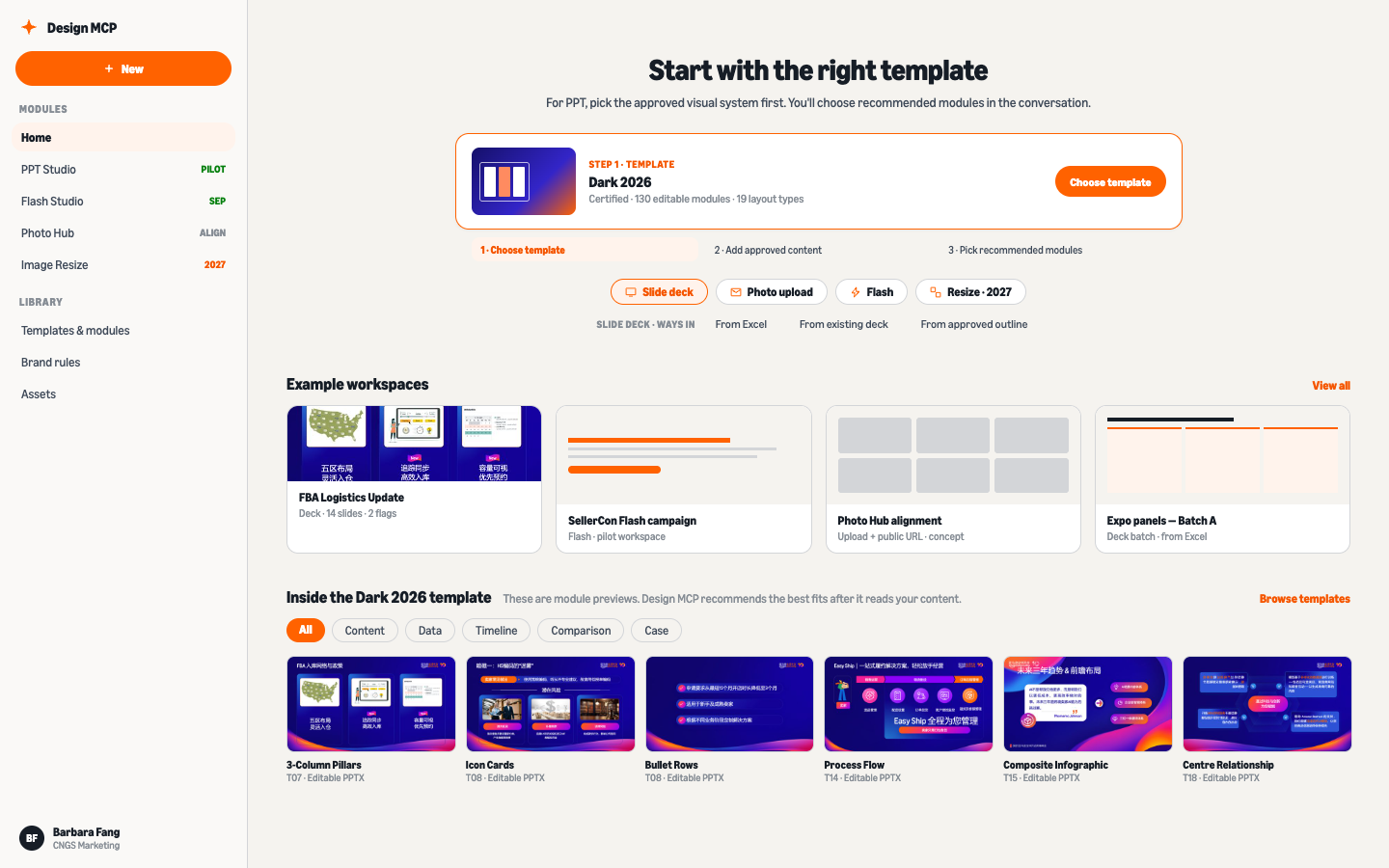
Design MCP entry hub
QA Review
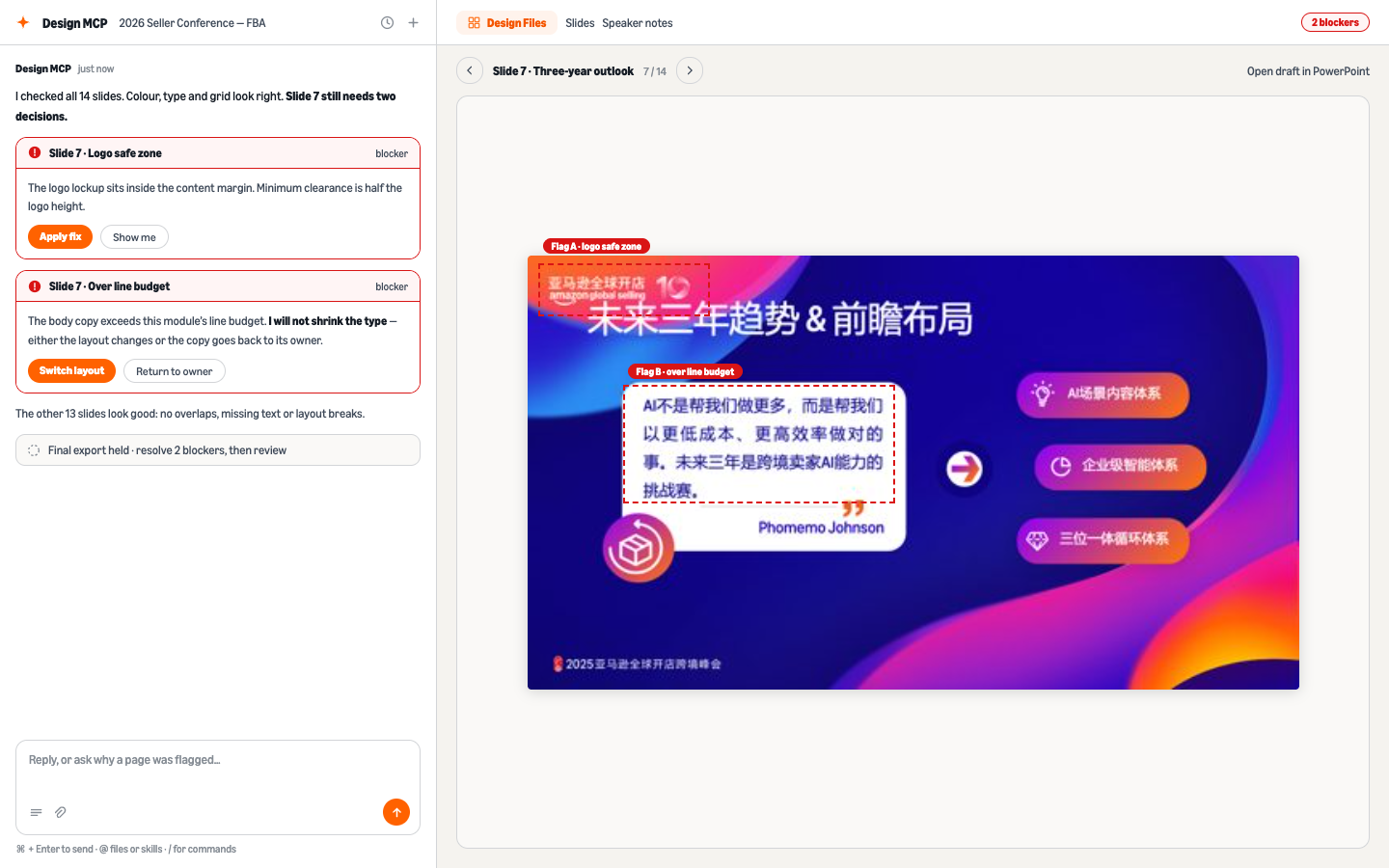
Quality checks and fixes within the conversation
Generate & refine
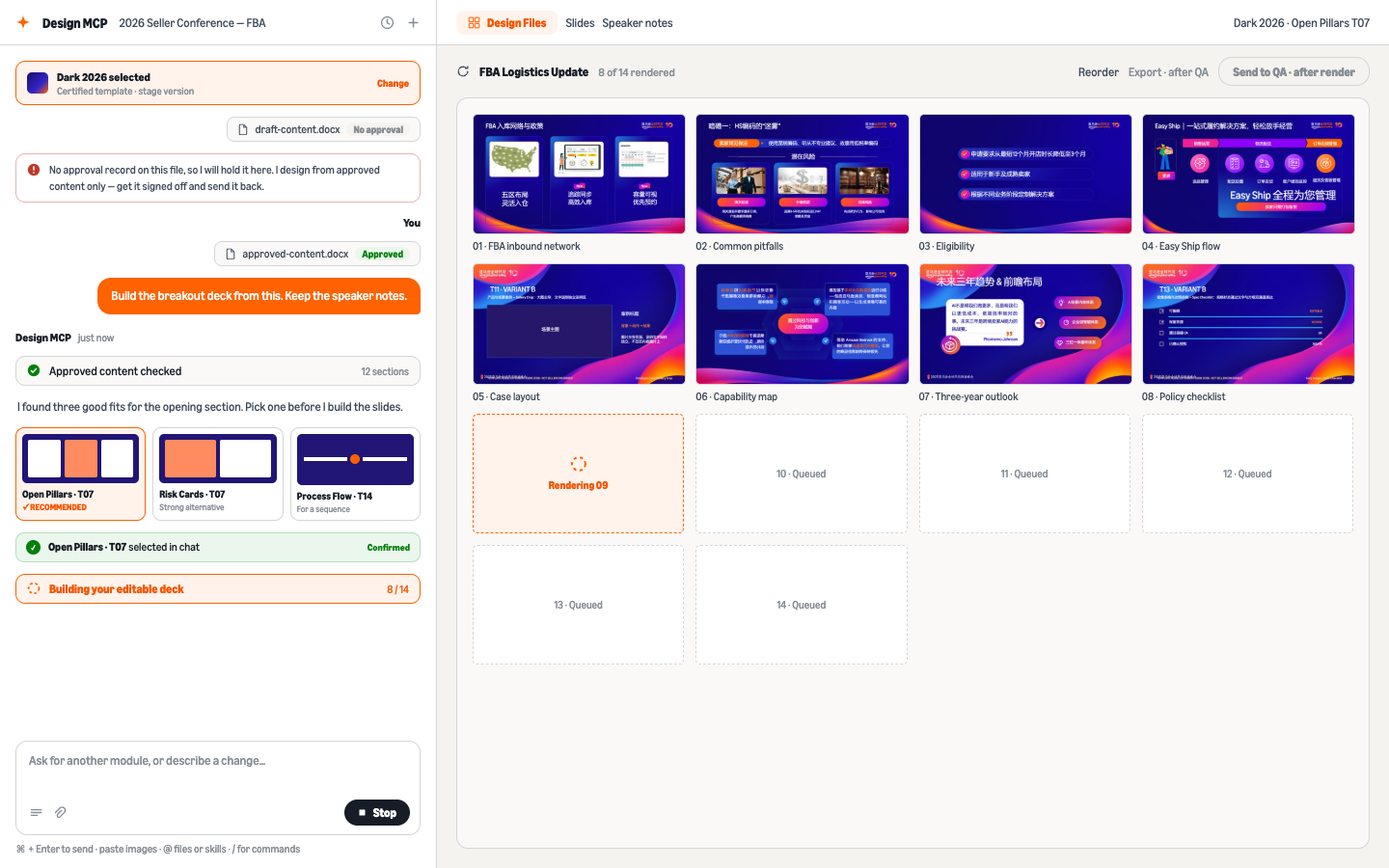
Generate slides using approved modules in conversation
Approved templates
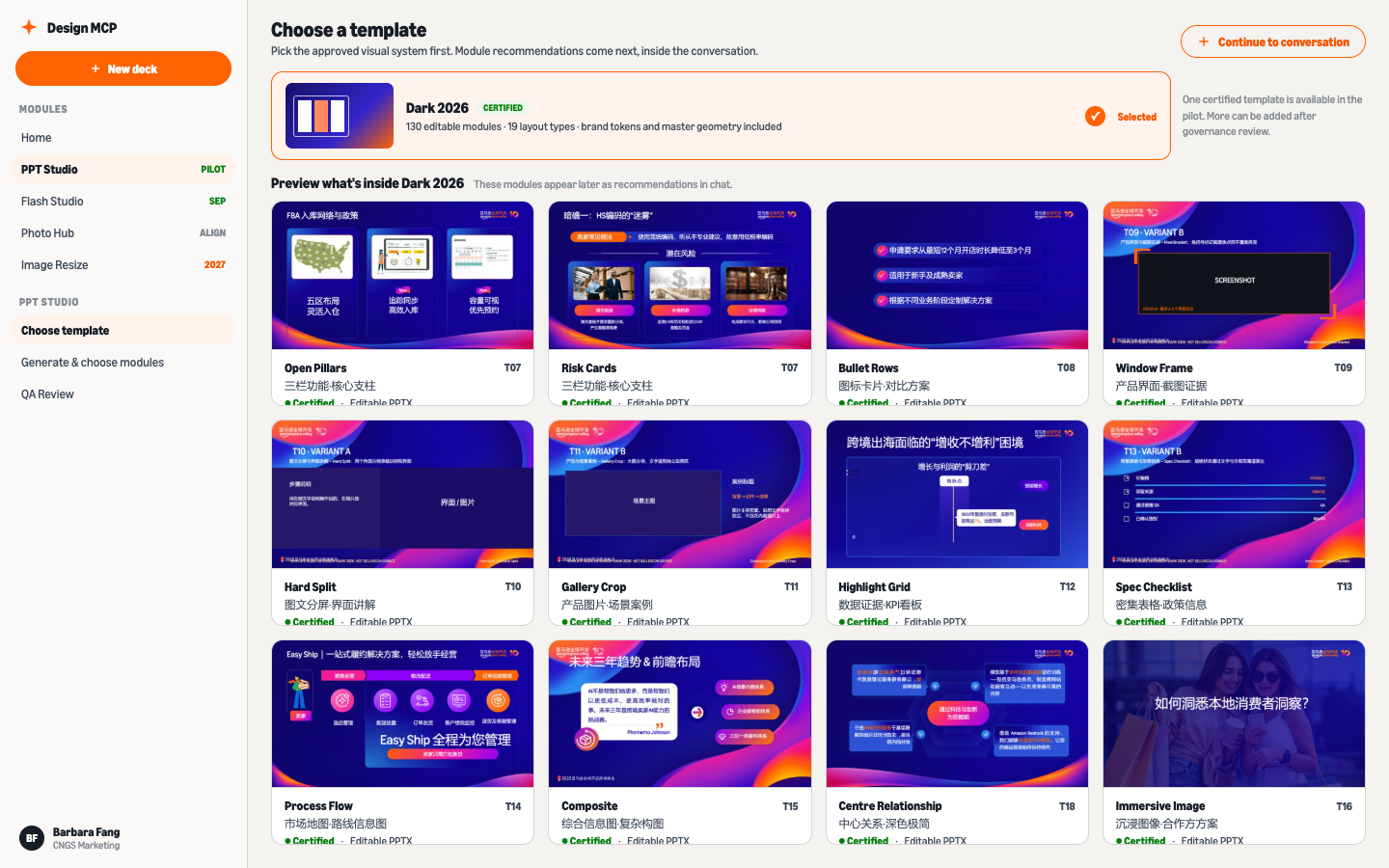
Approved PPT template library with original Chinese slide previews
One foundation. Governed paths from approved content to editable output.

A governed platform that turns approved content into brand-compliant, editable and localized output, without putting a designer in every routine production loop.

Role
Product & UX lead
Period
2024 — Present
Surface
Internal web platform
Scale
Org-wide · CNGS
Status
Mixed · MUSE live, platform in validation
130certified PPT layout modules
4product workflows on one platform
3 daysmanual exhibition deck placement today

System architecture

One entry, four governed workflows, one shared constraint layer.

Design MCPUnified entry · design execution only — content stays upstream
Phase 1

PPT Studio

Approved content → editable PPTX
  • Receive approved content
  • Choose template / KV
  • M×T match · 3 drafts · layout
  • Preview → adjust → .pptx
Phase 2

Resize & Adaptive

Posters · banners · social · extensions
  • Upload reference / KV
  • Pick scene + ratio
  • AI resize / visual extension
  • Preview → download
Phase 1

Flash / HTML

Approved content · multi-device
  • Import approved content
  • Choose template / channel
  • AI component layout
  • Multi-device preview → export
Phase 1

Image Assets

Stock candidates, feeding PPT
  • Own library + Adobe Stock (TBD)
  • AI tagging / ranking
  • 3 stacked candidates per slot
  • Source / rights visible
Design System MCP · shared constraint layerrev.10 token source · Visual Fingerprint · M01–M13 × T01–T18 mapping · layout/BG variants · two-layer collision QA

Frontend layer

Template PickerContent IntakePreview CanvasEditor PanelImage SelectorExport Hub

AI service & backend layer

Design orchestrationPPTX render engineImage candidate serviceHTML layout serviceImage retrieval connectorBrand rule injection
Future goal · 2027+ Creative Assets Hub — one asset center for outputs, templates and rules, reused across products

The problem

Amazon Global Selling China produces seller-facing decks, campaigns and event materials continuously. Everything routed through a small central design team, so the queue set the pace instead of the idea.

Making slides was never the hard part. The problem was how approved content becomes compliant, editable and localized output without the brand drifting one request at a time.

Product model · MCP

Design MCP is a Model Context Protocol server that holds the design system as executable capability — brand rules, certified templates, module libraries, rendering and QA — and exposes it to any AI client. PPT Studio, MUSE for HTML email, Adaptive Creative and the shared Image Library are four product paths that call the same server.

Why MCP rather than an API or a shared Skill:

APIWrap once per product

Every product has to integrate and adapt the design system separately. Four products, four integrations, four places rules drift.

SkillCopies that go stale

A shared skill is a snapshot of "how we do it", scattered across agents. Once shared, nobody owns the copy; it expires quietly.

MCPOne live source, any client

The latest brand rules, templates, render and QA live in one model-agnostic mechanism. Skills only guide when to call it. Every AI client reuses the same design system, always current.

I own the product definition, interface, template systems, validation rules and the operating model that connects design, engineering, vendors and business teams.

Why it holds up

Brand rules are versioned centrally, so one update propagates to the organisation instead of being re-explained for every request. Each workflow inherits the same logic for approval, QA and human intervention.

My role moved with the system: from taking design requests to owning the standards the system enforces.

Product 1

PPT Studio

Approved content → certified template → editable PPTX. Pilot, real-material validation.

How it works

The seller conference creates three different deck problems. Approved Chinese sessions need full template application. Global English keynotes need format conversion and image sourcing, while translation stays with its owner. Exhibition content arrives as a spreadsheet that one person currently spends about three days hand-placing into a 100-page deck.

Content routes to one approved template and a library of 130 certified layout modules. If copy does not fit, the system chooses another layout or returns the content—it does not shrink the type until the problem disappears.

Every page clears both structural collision checks and a 200% rendered visual review. This module is in real-material validation.

PPT Studio · product user journey

User actionAI / tool actionHuman quality control / choice ⏸Automated quality control
  1. Step 1 · Content side

    Prepare materials

    CommSphere · Pitch Deck Gen · Maven

    Collect semi-finished decksDaily decks · Accelerate EN versions · outline copy — any of the three content tools
    State the requirementBreakout first / Main Session limited · page count · output ratio
  2. Step 2 · Content side

    Structure the content

    CommSphere · Pitch Deck Gen · Maven

    Split into content modulesM01–M13 · content POC trimmed (P0=9 / P1=4)
    Seller-facing copyGenerator features live outside Design MCP; without one, Design MCP still generates from standard splits
    QC① Content accuracy ⏸Owner confirms · versioned
  3. Step 3 · Design side

    Module matching

    Design MCP

    Content → design moduleMany-to-many matrix · auto-recommended
    2 treatments per contentMinimal statement vs detail (short vs long copy)
    User picks one of two ⏸"Not too many options, never unlimited"
    Complex diagrams: skeleton onlyMessage house etc. · AI skeleton → human polish · non-P0
  4. Step 4 · Design side

    Design generation

    Design MCP

    Brand template + layout render
    Asset crawl → TBD placeholders
    QC② Automated visual QAType size · character count · overflow · brand compliance
    QC③ Image approval ⏸Purchasing costs money — always human
  5. Step 5 · Design side

    Multi-version export

    Design MCP

    Big screen → 16:9 live version
    EN ↔ CN · one-click template swapROA Hub capability exists · interface TBC
    Post-conversion visual recheck
  6. Step 6

    Final review & delivery

    QC④ Human final review ⏸Owner + designer · humans stay accountable
    Agency shifts to local fixesReduction measured by pilot, not assumed
    Deliver to SCUsage tracking · feedback loop

Four quality gates + one two-way choice · no presumed savings numbers

Main path · PPT Studio · pilot Oct 2026

From the hub to an editable deck — seven clicks, two gates

User · click / decideAI · design workGate · governance
1Choose template
2To conversation
3Content gate
4Pick module
5Render → QA
6Two decisions
Editable PPTX
1
User

Open Design Center, click Choose template

Every path starts on this hub. The certified Dark 2026 card sits at the top; the chips underneath are the other ways in — Photo upload, Flash, Resize · 2027.

The template library opens with Dark 2026 ready to inspect.

Design Center hub
Click
library opens · Dark 2026 ready
2
User

Preview the modules, click Continue to conversation

One certified visual system in the pilot: 130 editable modules, 19 layout types. The previews show what Dark 2026 contains before you commit.

A workspace conversation opens with the template locked in.

Template library
Click
workspace opens · template locked in
3
UserGate

Drop in your content file — the gate reads it first

draft-content.docx has no approval record, so it is held with a plain answer. Nothing renders from an unapproved draft.

Upload approved-content.docx and say what you need — the flow continues from the approved file only.
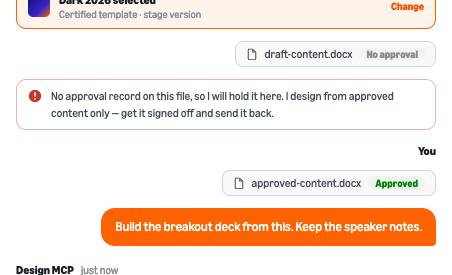
Chat · zoomContent gate in chat
Held
Upload
approved file only — draft stays held
4
AIUser

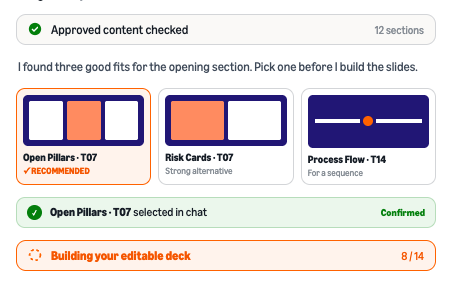
Pick a module in the chat

Design MCP reads the 12 approved sections and recommends three fits for the opening. Click Open Pillars · T07 to confirm.

The editable deck starts building — 8 of 14 slides and counting.

Chat · zoomModule recommendations
Click
module confirmed · deck building 8/14
5
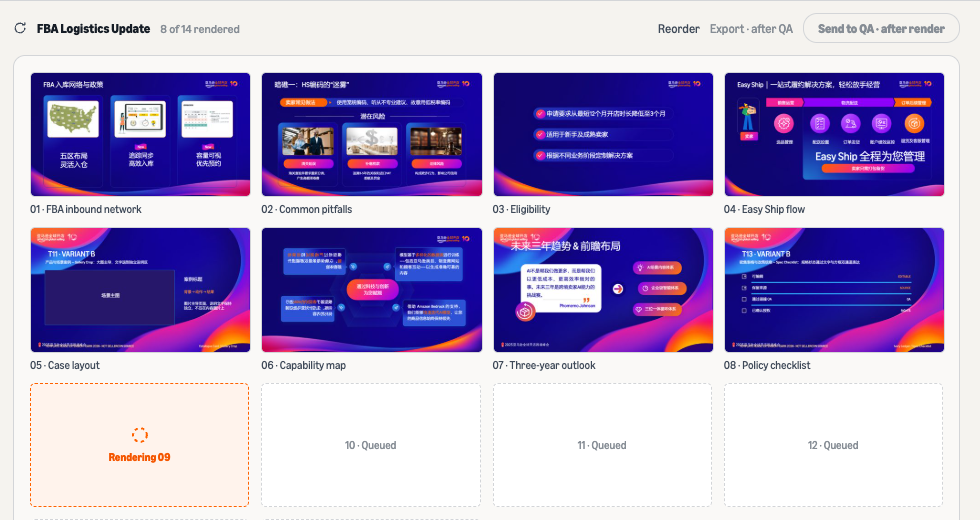
AIUser

Watch the render, then click Send to QA

Slides land in the Design Files panel as they finish — rendered, rendering, queued. The button stays greyed until every slide is in.

Send to QA unlocks only after render — click it and QA runs in the same thread.

Design files · zoomRender progress
Then click
14/14 rendered · QA runs in-thread
6
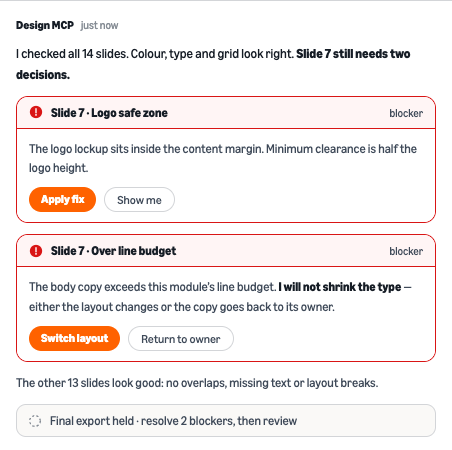
GateUser

Answer the two decisions on slide 7

QA checked all 14 slides; only slide 7 blocks. Click Apply fix for the logo safe zone. For the copy over budget, choose Switch layout — or return it to its owner.

The system never shrinks type to force a fit. Fit problems change the layout or go back to the content owner.

QA · zoomQA flags on slide 7
Click
Or this
2 fixes cleared · ready for human review
Outcome · step 7

Open in PowerPoint → editable PPTX

Native PowerPoint objects, speaker notes kept, brand tokens intact. It opens in PowerPoint as a working file, not a flattened export.

Product 2

MUSE

Marketing User Interface & Style Engine — takes raw content and produces on-brand, production-ready email HTML, doing the job of both a designer and a front-end coder.

Why it exists

The channel team owns the full email lifecycle for 800K sellers — roughly 600 emails a year. Two steps had become the bottleneck: a designer or agency hand-coded every email in 6–8 hours, then a specialist worked through about 80 manual setup steps before it could be sent. Slow, an agency cost, and only a few people could do it.

MUSE takes the first job. A marketer uploads a plain Word doc; MUSE lays it out on-brand and writes cross-client production HTML in 30–60 seconds. No designer or vendor in the loop. Deployment is handed to ECHO, an RPA operator that turns the ~80 Pardot steps into two clicks.

The engine

Production-grade rather than a generic AI draft, because a senior design team's judgment is built into the engine and applied to every email.

MUSE + ECHO · EMAIL PRODUCTION JOURNEY

User actionTool actionHuman review / choiceAutomated check
  1. Step 1

    Prepare content

    Approved Word documentThe marketer provides approved campaign copy.
  2. Step 2

    Generate with MUSE

    Production HTML + QA report68 design modules · 3 templates · 94 coding rules · 40 brand guidelines.
  3. Step 3

    Approve creative

    Human approvalReview the creative before deployment.
  4. Step 4

    Deploy with ECHO

    Set up in PardotRPA operator · ~80 steps → 2 clicks.
  5. Step 5

    Send

    Email delivered12.5 h manual → ~20 min.

Validation issue → return HTML or dynamic-field fixes to MUSE.

94 coding rules · on 68 modules / 3 templates

36Client compatibility — international & Chinese mail clients
16Responsive & performance
18Content generation rules
24Quality control & input validation

40 brand guidelines

13Colours & logo
9Typography
10Spacing & layout
8CTA hierarchy

Impact

Live on real seller campaigns since May, not a proof of concept. Announced to CNGS Marketing in August 2026.

6–8 h → ~1 minCreative + HTML, per email
4 days → 1.5 daysContent-to-send lead time
~7,300 hReleased per year, both products
¥200K → ¥0Annual agency fee, recurring
98 sends · 0 failures100% success since May
20 → ∞Email capacity — no longer limited by production

Design know-how now sits in the system rather than with one specialist, so any marketer can send a production email on their own.

MUSE in practice

A marketer starts with approved campaign copy in Word. MUSE turns it into production-ready HTML in 30–60 seconds, using a controlled module library instead of an open-ended visual generator.

Judgment stays with people. What leaves the queue is routine layout and coding, while creative approval and brand governance remain visible.

01 · APPROVED INPUT
02 · PRODUCTION HTML
SYSTEM EVIDENCE · COMPLETE CAMPAIGN EMAILS · ORIGINAL CHINESE CONTENT

MUSE 2 · Hyper-personalization

MUSE 1 produced one on-brand email per campaign. MUSE 2 produces one email per seller, with content written by an AI engine every business day. Live since September 2026, it connects MUSE to MAVEN, the seller-launch personalization program.

Problem · Agent-to-agent handoff

The biggest change was upstream: the content creator moved from a person to an agent. In MUSE 1, people prepared content in Word, where headings, paragraphs, lists, and emphasis already carried the intended structure. In MUSE 2, the content agent writes each seller’s email into one row of a sending list. The challenge was therefore agent-to-agent handoff: how could the design agent pass its email modules to the content agent through a plain-text spreadsheet cell, reliably across thousands of rows?

Solution · A compact semantic contract

I solved this with a compact semantic contract: seven tags for title, preview, salutation, body, sub-heading, list, and button, plus two inline markers for emphasis. I packaged the contract as a skill for the upstream content agent, enabling it to generate seller-specific content in a structure that maps directly to MUSE’s design modules. A deterministic parser then renders every row using the same brand and layout rules. No model runs at send time, so the output remains consistent while the content stays personal to each seller.

LIVE · HYPER INTERFACE2,189HTML outputs · one workbook batch
BUILT-IN QUALITY CONTROL

Green QC.
Checked and ready.

The green status opens the checks behind the selected email’s QC result.
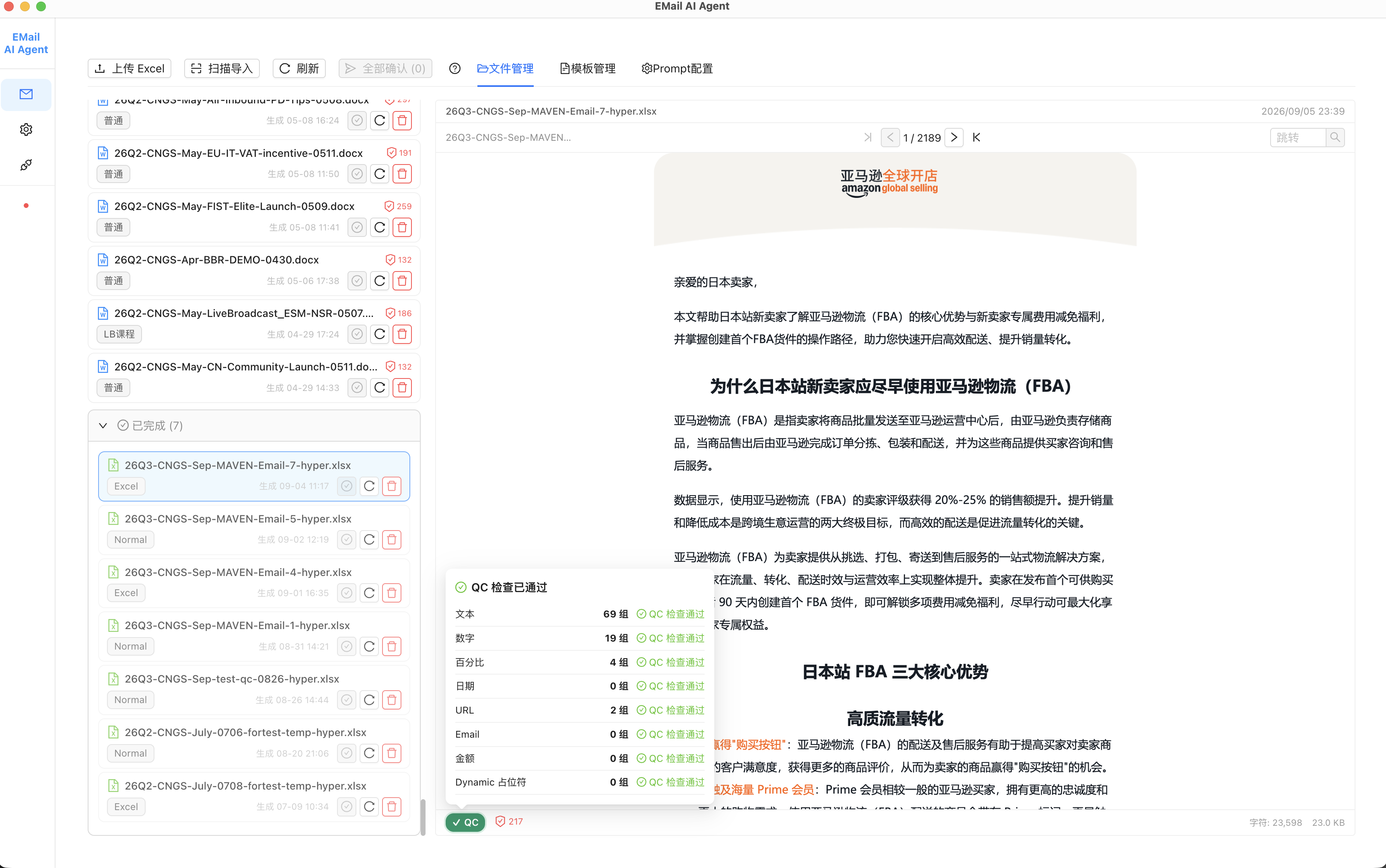
Hyper tool showing a batch of 2189 HTML outputs and the selected email’s passed QC panel
01 · Batch navigator
Original batch navigator showing 1 of 2189 HTML outputs
Viewing output 1 of 2,189
Original green QC status button in the live Hyper interface
03 · Green QC statusPassed for the selected email
02 · QC panel, enlarged
Original QC panel: passed; text 69 groups, numbers 19, percentages 4, URLs 2; dates, email, amounts and dynamic placeholders each 0
69 text groups19 number groups4 percentage groups2 URL groups

Also checks dates, email addresses, amounts and dynamic placeholders.

LIVE HYPER INTERFACE · 2,189 HTML outputs in one batch. Green QC shows the selected email has passed its checks.
SOURCE WORKBOOK

One content cell → one email.

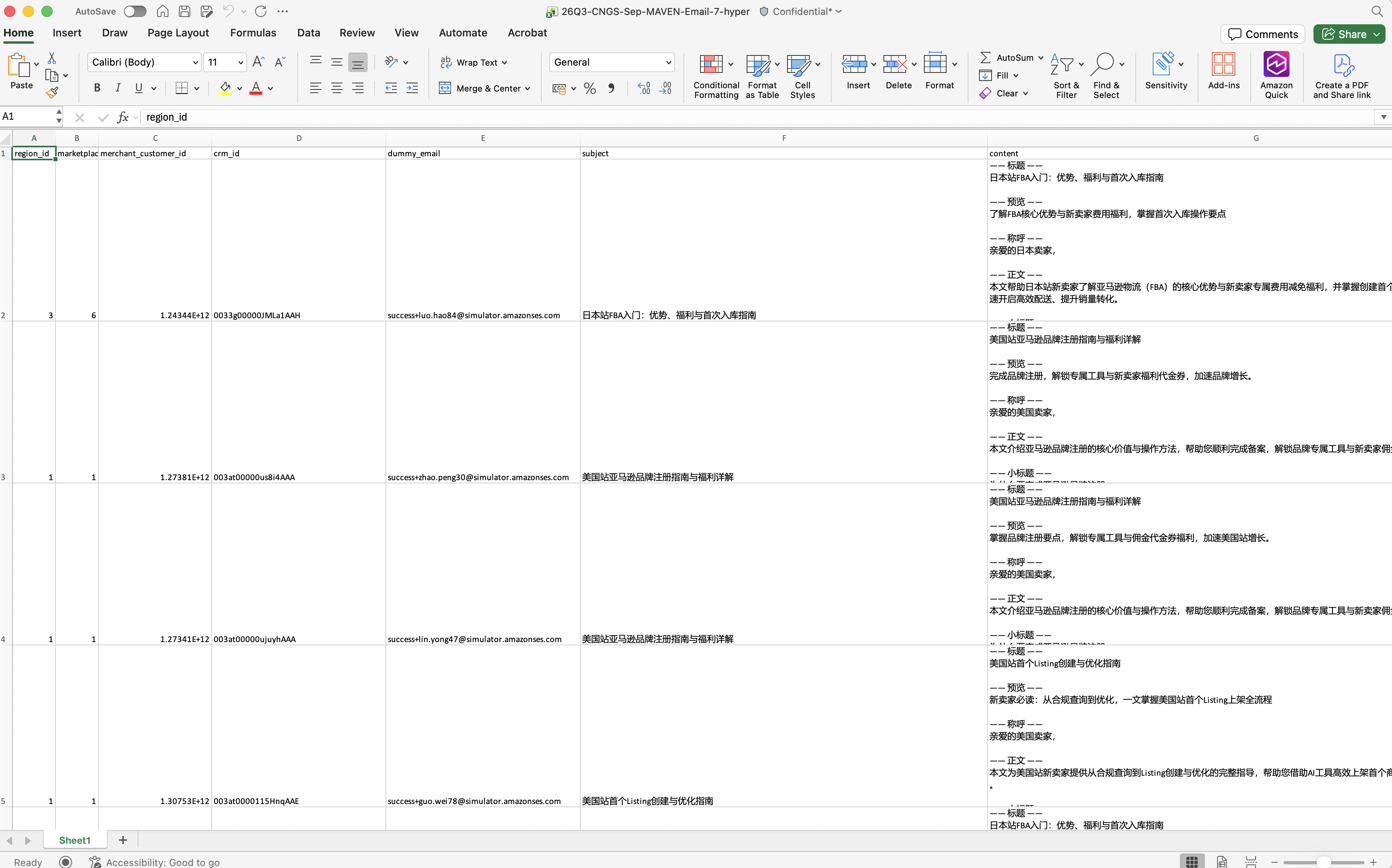
Original generated source workbook with the content column highlighted

Workbook overview · column G highlighted

contentColumn G · detail
Content column in the source workbook, with tagged title, preview, salutation and body text in Chinese
The source file carries each email’s tagged structure in the content column. Original Chinese copy is preserved.
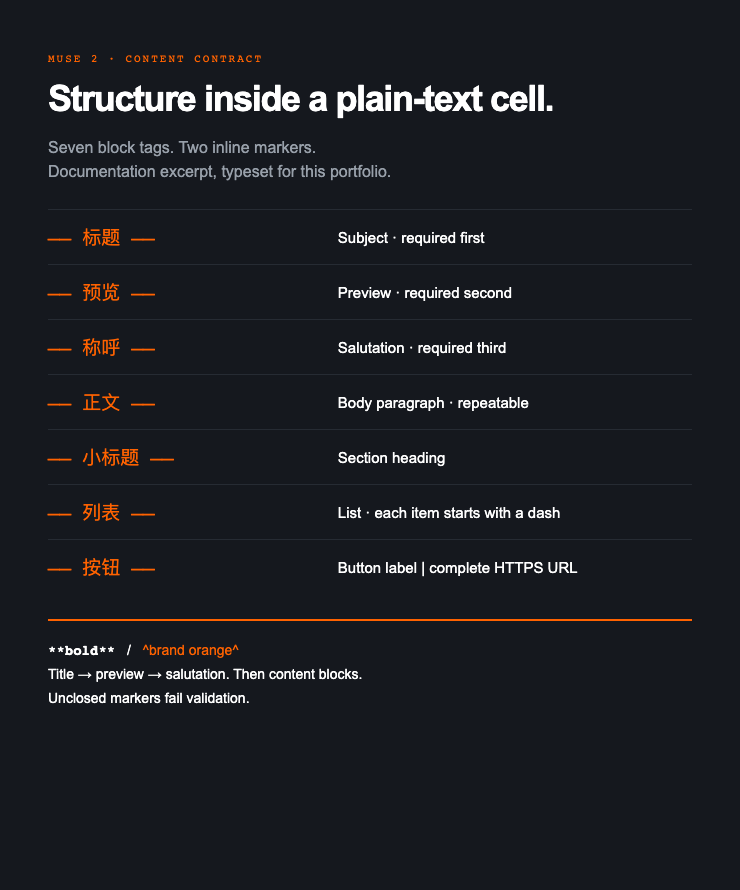
Seven-tag content contract, typeset from the August 2026 specification
CONTENT CONTRACT · TYPESET FROM THE AUGUST 2026 SPECIFICATION

Quality control

We built an independent QC step into the live pipeline. It checks that every rendered email faithfully preserves its source content before it can be sent.

HYPER · QUALITY CONTROL JOURNEY

User actionTool actionHuman review / choiceAutomated check
  1. Step 1

    Source content

    Provide the sourceOne tagged content cell per email.
  2. Step 2

    Generate HTML

    Assemble the emailUse the shared template and source content.
  3. Step 3

    Check fidelity

    Compare against sourceComplete · accurate · correctly structured.
  4. Step 4

    Resolve the result

    Pass → ready to sendGreen QC status appears in the interface.
    Fail → retry and recheckUp to 3 retries.
    Still failing → human reviewReview the reason and decide the next action.

QC checks fidelity. The content owner remains responsible for source accuracy and compliance.

Impact

MUSE 2 is the piece that turned MAVEN's email channel from a concept into a daily send. MAVEN can write per-seller content; without a deterministic HTML generator, no row of it becomes a brand email a seller can receive.

+55% capacity+22 sends a month on the 40 quota, zero added designer hours
Flat QC costReview by exception. Volume grows, review effort does not
No drift at scaleConsistent rendering rules across every row. Zero LLM in the send path
Program result · MAVEN pilot, first month
3.2×click rate vs lifecycle baseline (11.4% vs 3.6%) across 2,558 prospects reached
Program-wide figure for the personalization program across WeChat, WeCom and email, reported to WWGS SLT. Not attributable to the rendering pipeline alone.

Quality holds by rule rather than by a designer watching. Next: the same contract extends to tables, images and per-seller links.

What's next

Phase 1 · live
Standard ad-hoc + dynamic-content email. One upload generates multiple seller-segment versions automatically.
Phase 2 · live Sep 2026
Hyper-personalization. One individually generated email per seller, one batch every business day.
Next
Extend the content contract to tables, images and per-seller links.
Later
Decentralise. Move from one shared machine to a server so every marketing POC can run the AI directly.